


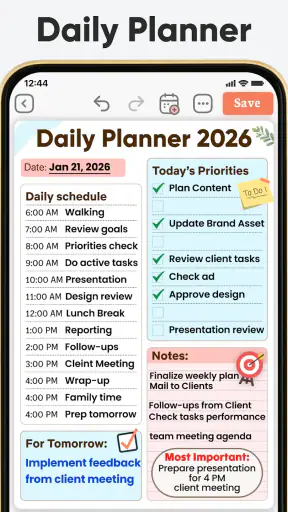
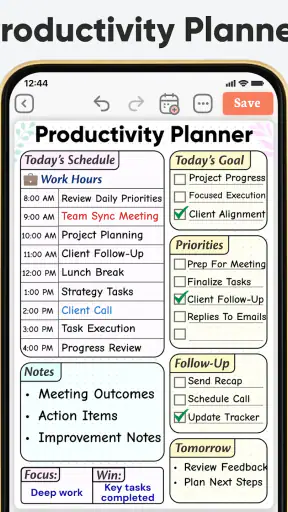
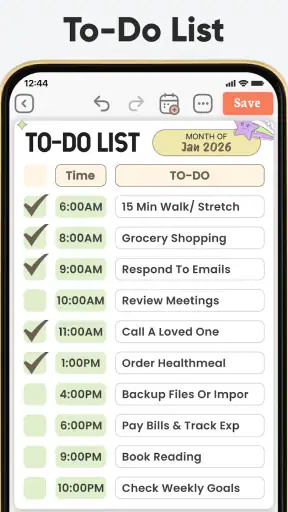
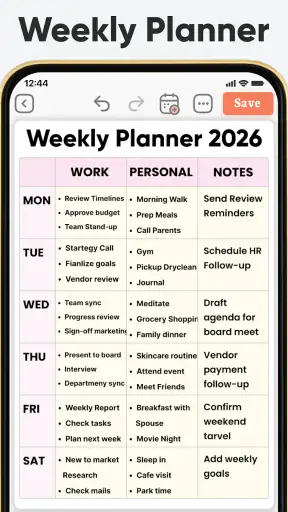
I approached Daily Planner, To Do List as a practical test of whether one Android app could make planning feel less scattered. My conclusion is fairly clear: it works best as a gentle, all-in-one routine builder rather than as a powerful project-management system. It brings daily tasks, planning pages, journaling, diary-style reflection, and schedule templates into one place, which is useful when your main problem is moving between too many separate tools.
That focus makes it especially appealing for people who want structure without a complicated setup. I can see it helping someone plan a workday, keep track of personal errands, write a short evening reflection, or create a repeatable routine around study, exercise, or household responsibilities. At the same time, users who need deep collaboration, detailed task dependencies, or a highly technical calendar workflow may outgrow it quickly.
How the planner feels in everyday use
The most convincing part of the experience is the way the app treats planning as more than a list of unfinished tasks. A to-do list tells me what remains, but a daily planner gives those tasks a place in the shape of the day. Adding journal and diary elements also changes the tone: the app is not only asking what I need to do, but encouraging me to notice how the day went.
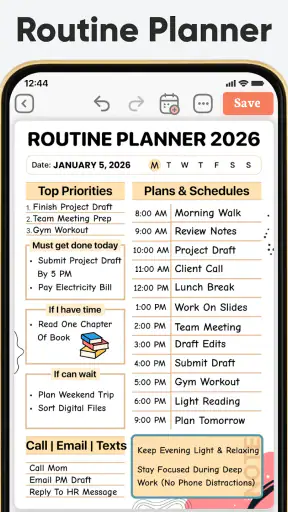
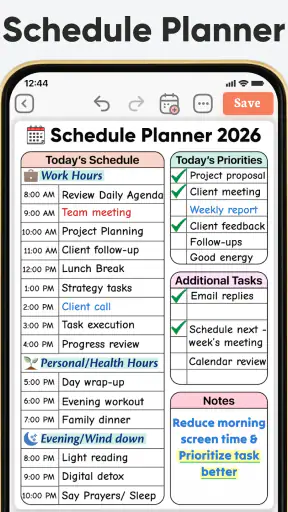
That combination is valuable for people who struggle with a blank page. Starting with an empty productivity app can be surprisingly difficult because every category, label, and routine has to be designed from scratch. The schedule planner templates reduce that initial friction. Instead of inventing a system, I can begin with a familiar daily outline and adjust it as I learn what actually fits my life.
I would not describe the experience as a replacement for every productivity tool. It is more personal and self-directed than a team workspace, and it is less suited to handling a large collection of interdependent projects. Its strength is the middle ground between a simple checklist and a paper planner: more guided than a bare notes app, but less demanding than a full project-management platform.
A realistic morning-to-evening workflow
Imagine a weekday with a remote work shift, a grocery trip, a medical appointment, and a personal goal that is easy to postpone. I would start by placing the fixed appointment and work period into the day’s plan, then add the grocery trip as a task with a clear point in the schedule. The personal goal could be kept deliberately small, such as reading a few pages or taking a short walk, rather than being written as a vague promise to “be productive.”
During the day, the list becomes a visual reminder of what matters now instead of a long inventory of everything that might matter eventually. In the evening, the journal or diary side gives me a place to record what was completed, what was unrealistic, and what should move forward. That last step is more important than it sounds. Without a review, planning apps often become storage boxes for abandoned intentions.
My practical tip is to avoid filling the day with ideal behavior. The app can help organize a realistic plan, but it cannot make every hour equally available. I get better results when I leave room for delays and choose a small number of meaningful priorities. The templates are most useful as a starting framework, not as a schedule that must be obeyed perfectly.
Why the journal and diary elements matter
Many task apps treat reflection as unnecessary decoration. Here, the diary and journal angle gives the planning process a useful second half. If I repeatedly fail to complete a task, a short note can reveal whether the problem is poor timing, an oversized goal, or simply a recurring obligation that belongs in a different part of the day.
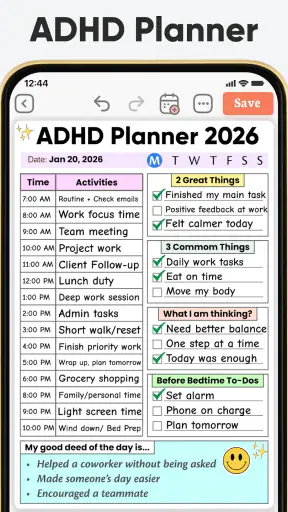
This is also where the app may appeal to people looking for ADHD-friendly structure. I would be careful not to treat any planner as a substitute for professional support, but a visible routine, smaller actions, and a place to review patterns can reduce the mental effort of deciding what to do next. The benefit comes from using the app consistently and keeping the system simple, not from expecting a template to solve attention or motivation difficulties by itself.
A useful workflow is to write tomorrow’s first task during the evening review. That removes one decision from the next morning and makes the opening step concrete. I also prefer recording why a task was postponed rather than merely moving it forward. “Too large,” “waiting for someone,” and “not important today” lead to very different planning decisions.
Templates can help, but they should not control the day
The schedule templates are a meaningful advantage for beginners and for anyone whose routine changes only slightly from day to day. A template can act like a reusable skeleton for workdays, study days, self-care routines, or household planning. The key trade-off is that a ready-made structure can feel productive even before it has been tested against real life.
I recommend using a template for several days, then removing anything that never influences a decision. If a section is always skipped, it may be unnecessary rather than evidence of poor discipline. Likewise, if a routine has too many small entries, combining them into a broader block may make the plan easier to maintain. The best planner is usually the one I will still open on a tiring day.
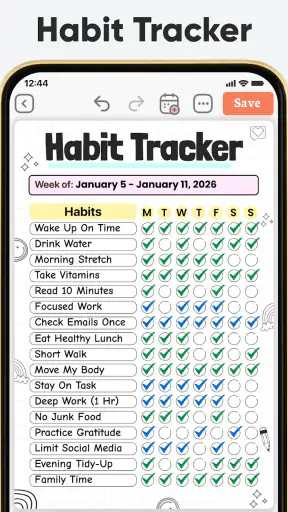
This is one of the app’s less obvious strengths: it can serve as a temporary experiment for building a routine. I can try a morning sequence, an exam-preparation pattern, or a weekly reset without committing to a complicated productivity philosophy. After the experiment, the useful parts can remain while the rest is discarded.
Where it compares well with familiar alternatives
Compared with a basic notes app, this planner offers a clearer separation between tasks, schedules, and reflection. Notes are excellent for capturing information, but they rarely encourage me to decide when an action belongs in the day or to review the result afterward. This app is more intentional for personal routines.
Compared with a traditional paper planner, it is easier to revise a plan when an appointment changes or an errand takes longer than expected. Digital planning also makes it less painful to reuse a structure. Paper still has advantages, though: handwriting can feel more immediate, and a physical page has fewer distractions. People who enjoy the tactile ritual of writing may not find a digital diary as satisfying.
Compared with a calendar-first productivity system, the emphasis here feels more balanced between scheduled events and flexible tasks. A calendar is usually strongest when time and appointments are the central concern. This app makes more sense when I also want a personal checklist and a reflective record of the day. If my work depends on shared calendars, invitations, meeting coordination, or complex recurring events, I would choose a dedicated calendar or task platform instead.
Compared with a feature-heavy project manager, the advantage is approachability. I do not need to think in terms of boards, dependencies, team roles, or elaborate status systems to plan a normal day. The downside is the same simplicity: large projects with many contributors and changing relationships between tasks are better handled elsewhere.
The main weakness is the risk of overplanning
The biggest limitation is not that the app lacks ambition; it is that the combination of planner pages, tasks, templates, and journaling can tempt me to manage the system instead of managing my commitments. A person who enjoys organizing may spend too much time refining categories and too little time acting on the next task.
There is also a natural tension between a detailed schedule and the unpredictability of ordinary life. A plan can look excellent in the morning and become discouraging after one delayed appointment. Users who interpret an incomplete day as failure may need to keep the system deliberately light. I find it healthier to treat the plan as a guide that can be rewritten, not as a scorecard.
The app is also not the right choice for everyone who wants a to-do list. Someone who only needs a quick place to capture errands may find the journal and template approach unnecessary. In that case, a minimalist checklist may be faster. Likewise, a user who wants extensive automation, team assignment, or detailed project reporting should look toward a more specialized productivity service.
Another practical consideration is the free model. The app is free to install and use, while optional in-app purchases range from about four dollars to nearly forty-eight dollars per item. That makes it accessible to try, but I would still examine which parts of the experience I genuinely use before paying for extras. The value depends on whether the broader planning and reflection workflow becomes part of my routine, not simply on how many templates are available.
Who will get the most from it
I think this app is a strong fit for people who want one personal space for daily planning and reflection. Students can use it to break study goals into manageable sessions and review what worked. Busy adults can combine appointments, household tasks, and personal routines without maintaining separate notebooks. People who are beginning to explore structured planning may appreciate having a starting point instead of designing a system from nothing.
It can also suit anyone who repeatedly writes ambitious lists and then feels overwhelmed by them. The diary element encourages a more useful question than “Why did I fail to finish everything?” I can ask which tasks mattered, which ones were too broad, and which commitments should not have been placed on the same day. That shift from self-criticism to adjustment is one of the most worthwhile habits the app can support.
I would recommend skipping it if your priority is shared work. A family or team may need assignments, comments, permissions, and synchronized project status, while this experience is better understood as an individual planning companion. I would also skip it if you strongly prefer a paper notebook or an extremely bare interface with no reflective features.
Details that affect the decision
Daily Planner, To Do List is a productivity app from Simple Productivity Apps. It is free, aimed at Everyone, and works on Android devices running version 8.0 or later. The current release is version 98.0, and its broad availability is reflected in more than a million installs, with an average rating of 4.6 from roughly one hundred forty-eight thousand ratings.
Those figures suggest that the app has found a substantial audience, but popularity should not replace a personal test. The important question is whether I want a combined planner, checklist, and journal. If I only want reminders, the extra structure may feel like work. If I want to understand my routines and make tomorrow easier to start, the combination becomes much more convincing.
For privacy-conscious users, my advice is practical rather than dramatic: read the app’s current permission and privacy details on the store page before building a long personal diary inside it. A planner can contain sensitive information about health, work, relationships, and daily movements. I would avoid writing anything there that I would not want exposed unless I had checked the protections that matter to me.
My final recommendation
After using it as a daily planning companion, I see Daily Planner, To Do List as a thoughtful option for people who need more than a checklist but less than a professional project-management suite. Its best idea is the connection between planning and reflection: I can decide what to do, place it into a workable day, and look back without opening several unrelated apps.
The app is most effective when I keep the routine modest. Choose a template, add only the commitments that genuinely matter, leave breathing room, and use the journal to improve the next plan rather than to create a perfect record. That workflow turns the app from a collection of productivity pages into a practical habit.
My verdict is positive, with a clear qualification. I would recommend it to students, solo workers, busy households, and anyone experimenting with structured routines, especially if ADHD-friendly planning ideas appeal to them. I would choose a simpler list for quick errands and a more specialized platform for collaboration or complex projects. For the right user, though, the real strength is its balance between action and self-review: it helps organize the day while leaving room to learn from how that day actually went.


